
One of the most frequent errors individuals make when attempting to repair a broken display is ordering the incorrect part. Since the laptop’s outside is identical, it’s simple to presume that any panel marked with that model number will function. In actuality, a replacement laptop screen must precisely match a number of specifications, or else it will fit but work poorly.
To ensure that you get it right the first time, this article explains exactly what to look for before placing an order for a part or scheduling a repair.
Table of Contents
- Why Getting the Right Screen Matters
- Key Specs to Check Before You Replace
- Panel Type Explained: TN, IPS, and OLED
- Touchscreen vs. Non-Touch Considerations
- Signs Your Laptop Actually Needs a New Screen
- DIY Install vs. a Professional Repair
- Quick Reference: Replacement Screen Checklist
- Finding the Right Screen Replacement Service in Raleigh, NC
- Conclusion
- Frequently Asked Questions
Why Getting the Right Screen Matters
A mismatched panel doesn’t always fail outright, sometimes it just underperforms. Colors look slightly off, the resolution doesn’t match your laptop’s native display settings, or the screen sits a little loose in the bezel. None of these are dealbreakers on paper, but they add up to a laptop that never quite feels right again.
Getting the correct replacement laptop screen from the start avoids all of that. It also saves you from paying twice, once for the wrong part, and again for the one that actually fits.
Key Specs to Check Before You Replace
Before ordering any replacement screen for laptop use, confirm these details:
- Exact model number — found on the bottom of the laptop, not just the general product line
- Screen size — measured diagonally, usually 13″, 14″, 15.6″, or 17″
- Resolution — HD, Full HD, or higher; installing the wrong resolution can distort the display
- Connector type — the cable that plugs into the panel varies by model and isn’t universal
- Panel finish — matte or glossy, which affects glare and readability
- Touch capability — touch and non-touch panels are not interchangeable
Skipping any one of these is usually why a “compatible” part doesn’t actually work once installed. Getting these specs right the first time is what makes a replacement laptop screen perform exactly like the original.
Panel Type Explained: TN, IPS, and OLED
Not all laptop panels are built the same way, and knowing the difference helps you evaluate what you’re getting with any laptop lcd screen replacement.
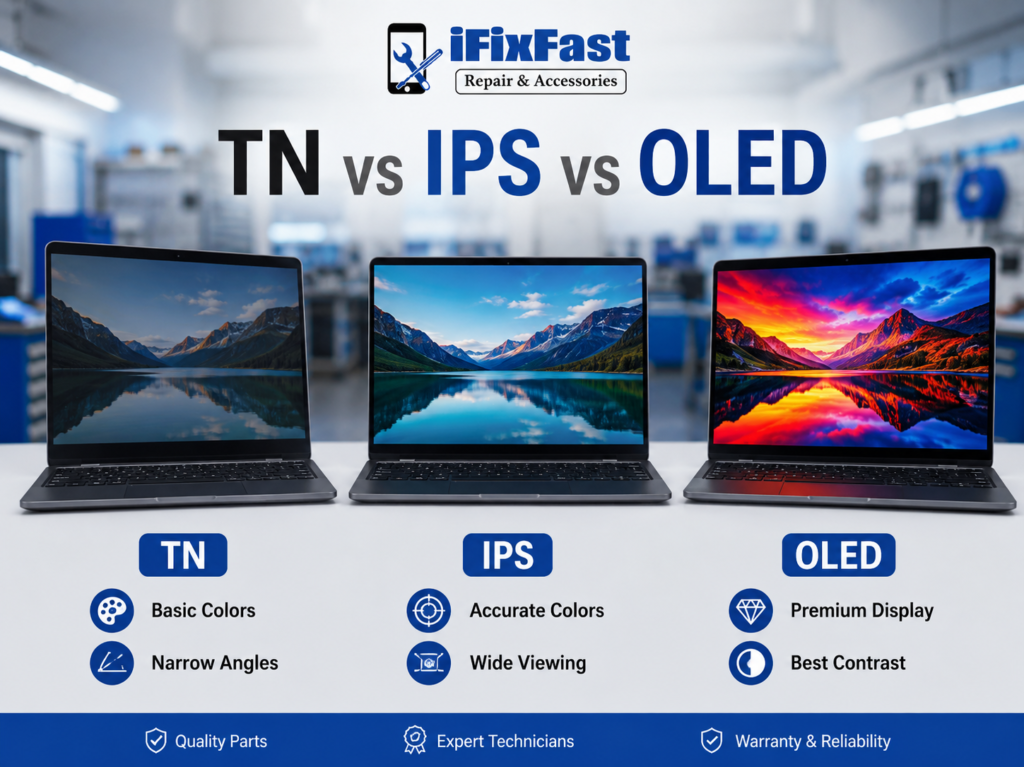
| Panel Type | Viewing Angles | Color Accuracy | Common Use |
| TN | Narrow | Basic | Budget and older laptops |
| IPS | Wide | Strong | Most modern laptops |
| OLED | Wide | Excellent | Premium and creative-focused models |
If your original screen was IPS and the replacement is TN, you’ll notice the immediately washed-out colors and a picture that shifts when viewed from an angle. Matching panel type is just as important as matching size.
Touchscreen vs. Non-Touch Considerations
The replacement laptop screen must include a digitizer layer in addition to a display panel if the original laptop had a touchscreen. Since the two are physically distinct components, installing a non-touch panel on a touch-enabled laptop will restore the image but completely eliminate the touch feature.
This is one of the most typical ordering blunders, especially when browsing by model number alone rather than validating touch capability directly.
Signs Your Laptop Actually Needs a New Screen
Before you commit to a full replacement, it helps to ensure the display itself is the problem:
- Visible cracks, spider-web fractures, or shattered glass
- Vertical or horizontal lines going across the photo
- Dark patches or discolouration that spreads over time
- Flickering that worsens when the lid is moved
- When the laptop is powered on, the screen remains black.
If an external monitor displays a clear image but the built-in display still exhibits these problems, it indicates that a cracked laptop screen replacement is more necessary than a more complex hardware repair.
DIY Install vs. a Professional Repair
Once you’ve sourced the correct replacement laptop screen, the next decision is whether to install it yourself or have someone repair laptop screen issues for you.
DIY makes sense if:
- You’ve matched every spec above precisely
- You have anti-static tools and a clean, flat workspace
- You’re comfortable working with small screws, clips, and delicate cables
- Your laptop isn’t under an active manufacturer warranty
A laptop screen repair service is the better call if:
- You want the panel diagnosed and confirmed before ordering
- Your model has a more complex chassis or a touchscreen
- You’d rather have a warranty backing the work
- You want it done correctly the first time without troubleshooting
Plenty of people start the DIY route and end up bringing the laptop to a shop anyway after a cable gets misaligned or a clip snaps. Starting with a professional laptop replacement screen service often saves that extra step entirely.
Quick Reference: Replacement Screen Checklist
| Check | Why It Matters |
| Exact model number | Ensures correct fit and connector match |
| Screen size | Panels aren’t interchangeable across sizes |
| Resolution | Wrong resolution distorts the display |
| Panel type (TN/IPS/OLED) | Affects color and viewing angle |
| Touch vs. non-touch | Touch layer is a separate component |
| Connector type | Cable mismatch prevents proper function |
Finding the Right Screen Replacement Service in Raleigh, NC
Matching every spec above on your own takes time, and one wrong detail means reordering and starting over. A local screen replacement service Raleigh residents can visit in person skips that guesswork, someone can pull up your exact model, confirm the panel type, and source a matching part without you having to research connector types yourself.

iFixFast, located in Raleigh, is one option in the area offering laptop and computer repair service for a range of brands, alongside general laptop repair services for other hardware issues. A shop that handles this work daily can confirm you’re getting the correct replacement laptop screen without the back-and-forth of ordering parts yourself.
Conclusion
A replacement laptop screen only works as well as the specs behind it. Model number, resolution, panel type, and touch capability all have to line up, or you’ll end up with a screen that technically fits but doesn’t perform the way the original did. Whether you handle the install yourself or bring it to a professional, getting those details right upfront is what makes the difference between a repair that lasts and one you end up redoing.
Ready to fix your screen? Get in touch with iFixFast in Raleigh, NC,today for a proper diagnosis and the correct replacement part the first time.
Frequently Asked Questions
1. How can I locate the precise replacement laptop screen for my model?
Before placing a purchase, make sure the screen size, resolution, connector type, and touch capability match the model number displayed on the bottom of the laptop.
2. Can I use any screen as long as the size matches?
No. Size is only one factor, resolution, connector type, panel type, and touch capability all need to match for the replacement to work correctly.
3. What’s the difference between TN, IPS, and OLED panels?
TN panels are budget-friendly with shorter viewing angles, IPS offers stronger color accuracy and wider angles, while OLED delivers the best contrast and color for luxury laptops.
4. Will a non-touch screen function on a laptop that was previously equipped with touch?
It will restore the image, but the touch feature won’t function because non-touch panels lack the distinct digitizer layer that touchscreens require.
5. Is it worth mending a cracked screen or should I replace the laptop?
If the remainder of the laptop is in decent shape, a cracked laptop screen replacement is usually considerably more feasible than replacing the complete device.
7. How long does a laptop screen replacement take?
Once the correct panel is confirmed and available, most replacements are completed within the same day.
8. Where can I get a laptop screen replaced in Raleigh, NC?
Local shops such as iFixFast provide laptop and computer repair service, including screen diagnosis and replacement for a range of laptop brands.