
Your laptop battery is one of the few components that’s guaranteed to wear out over time, no matter how carefully you use your device. Unlike a screen or keyboard, which only breaks if something goes wrong, a battery degrades simply through normal charging cycles. Eventually, every laptop owner in Raleigh faces the same question: is it time for a laptop battery replacement?
This guide breaks down how laptop batteries actually degrade, how to tell the difference between a battery problem and something else, what the laptop battery replacement process looks like in Raleigh, NC, and how to get the most life out of your next battery. It’s written for anyone in Raleigh, Durham, Cary, Apex, or the wider Triangle area dealing with a laptop that just can’t hold a charge like it used to.
How Laptop Batteries Actually Wear Out
Every rechargeable laptop battery is rated for a certain number of charge cycles, generally somewhere in the range of a few hundred to around a thousand, depending on the battery type and manufacturer. A charge cycle is a full discharge and recharge, though it doesn’t have to happen in one sitting; using 50% one day and 50% the next also counts as one cycle.
As a battery goes through more cycles, its maximum capacity shrinks. A battery that once lasted 8 hours might only last 3-4 hours after a couple of years of regular use, even though it still technically “works.”
Factors that speed up battery wear:
- Frequent full discharges (letting the battery drop to 0% often)
- Leaving the laptop plugged in at 100% for extended periods
- Exposure to heat, including using the laptop on soft surfaces that block airflow
- Age, since batteries degrade chemically over time even with light use
- Charging with a non-original or low-quality charger
Do You Actually Need a Laptop Battery Replacement? A Quick Self-Check
Before booking a laptop battery replacement, it’s worth ruling out issues that only look like a battery problem.
Likely a battery issue if:
- Battery percentage drops noticeably faster than it used to
- The laptop shuts down suddenly at 20-30%, not just near 0%
- Battery health reports (visible in system settings on most laptops) show a significant capacity drop
- The laptop only stays on while plugged into the charger
Might be something else if:
- The laptop won’t charge at all, even when plugged in — check the charging port and cable first
- The laptop shuts down even while plugged in — this could point to a power delivery or motherboard issue
- Battery drains fast, but system settings show battery health is still fine — background apps or software settings may be the cause
Most laptops let you check battery health directly in system settings (Windows) or through built-in diagnostics (Mac), which gives a clearer picture than guessing from symptoms alone.
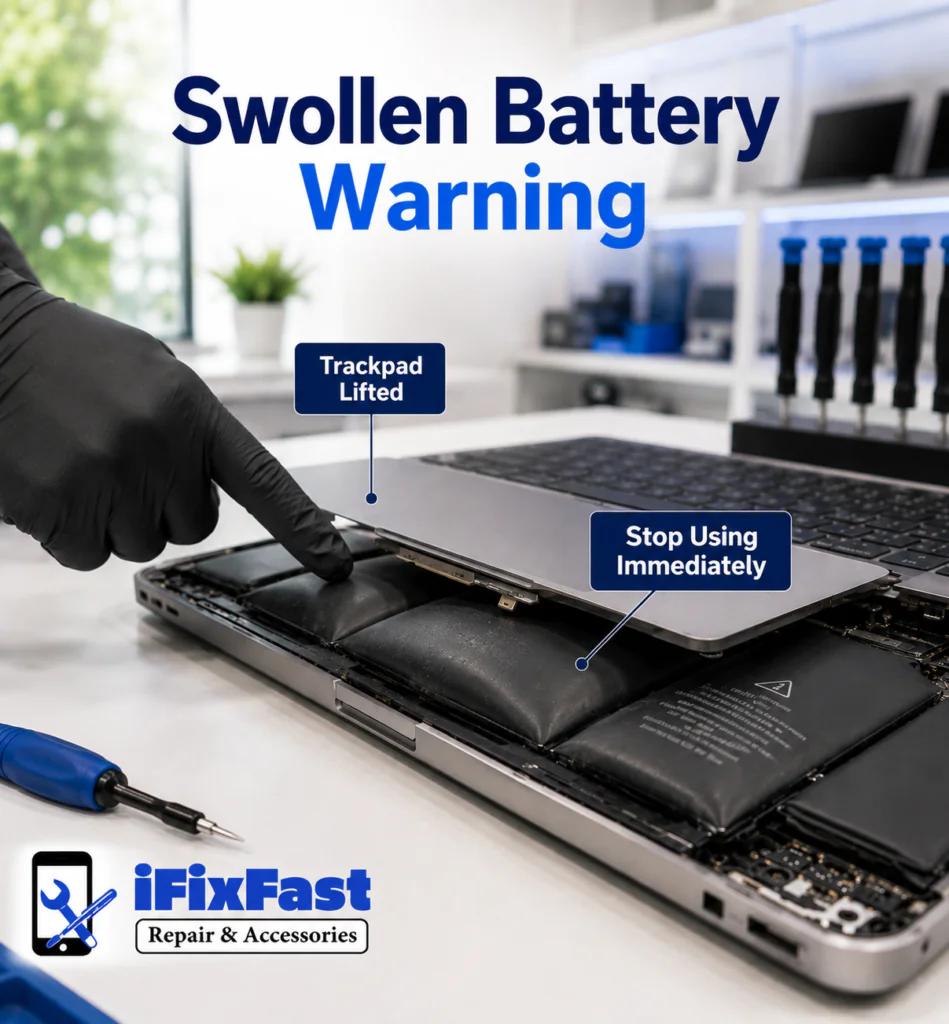
The Swelling Battery: A Safety Issue, Not Just a Performance One
One of the more serious signs that you need a laptop battery replacement isn’t slow performance — it’s physical swelling. A swollen battery can cause the trackpad to lift, the keyboard to bulge, or the laptop’s bottom case to no longer sit flat.
If you notice any of these, stop using the laptop and have it inspected as soon as possible:
- A trackpad that feels raised or doesn’t click evenly
- A laptop that no longer sits flat on a table
- Visible bulging near the keyboard or underside
- A case that seems to be separating slightly at the seams
Swollen lithium-ion batteries can pose a fire risk if punctured or damaged further, so this isn’t something to wait on.
What the Laptop Battery Replacement Process Actually Involves
Laptop battery replacement varies depending on the laptop’s design, and understanding the steps can help you know what to expect from a professional laptop battery replacement service:
Laptops with user-accessible batteries: Some models allow the battery to be removed and replaced relatively easily, often secured with a few screws inside the bottom panel.
Laptops with internal, glued batteries: Many modern ultrabooks and MacBooks use batteries that are adhered directly inside the chassis. These require careful removal using adhesive-release methods to avoid damaging surrounding components, like the trackpad cable or speakers.
A typical replacement process includes:
- Confirming battery health through diagnostics before starting
- Opening the laptop and disconnecting the battery safely
- Removing the old battery, using extra care if it’s glued in place or showing signs of swelling
- Installing the new battery and reconnecting it properly
- Testing charge behavior and battery health readings before reassembly is finalized
New vs. Refurbished vs. Third-Party Batteries for Laptop Battery Replacement
Not all replacement batteries are the same, and it’s worth understanding the difference before choosing a laptop battery replacement option:
| Type | What It Means | Consideration |
|---|---|---|
| OEM (original manufacturer) | Made by or for the laptop’s original brand | Typically closest match to original performance |
| Third-party / aftermarket | Made by other manufacturers to fit the same laptop model | Often more affordable, quality varies by brand |
| Refurbished | A used battery that’s been tested and reconditioned | Lower cost, but generally shorter remaining lifespan |
Ask your repair provider what type of battery they’re installing, since this affects both cost and how long the replacement will last.
Getting More Life Out of Your Next Battery
Once your laptop has a fresh battery, a few habits can help it last longer:
- Avoid keeping the laptop at 100% charge for extended periods when possible
- Try not to let the battery repeatedly drain to 0%
- Keep the laptop in a cool environment and avoid blocking vents during use
- Use the original or a quality-matched charger rather than an unverified cheap alternative
- Check battery health periodically through system settings to catch early wear
What to Do With Your Old Battery
Laptop batteries shouldn’t go in the regular trash, since they contain materials that require proper disposal or recycling. A reputable repair shop will typically handle old battery disposal responsibly as part of the replacement service — it’s worth asking if you’re not sure what happens to the battery once it’s removed.
Why Choose iFixFastNC for Laptop Battery Replacement in Raleigh, NC
iFixFastNC handles laptop battery replacement for laptops, phones, tablets, and other devices across the Raleigh, NC area, including Durham, Cary, Chapel Hill, Wake Forest, Apex, Garner, Holly Springs, and Morrisville. Every laptop battery replacement starts with a battery health check so you know exactly what’s happening before any work begins, not just a guess based on symptoms.
Laptop not holding a charge like it used to?
Contact iFixFastNC for a laptop battery replacement diagnostic and estimate.
Frequently Asked Questions
How long should a laptop battery last before needing a laptop battery replacement?
Most laptop batteries are rated for a few hundred to around a thousand charge cycles, which typically translates to somewhere between two and four years of regular use before a laptop battery replacement becomes necessary.
Can I keep using my laptop if the battery is swollen?
No. A swollen battery should be treated as a safety concern. Stop using the laptop and have the battery inspected and replaced as soon as possible.
Is it bad to leave my laptop plugged in all the time?
Keeping a laptop at 100% charge for extended periods can contribute to faster battery wear over time, though modern laptops often include some level of charge management to reduce this effect.
How do I check my laptop’s battery health?
Most Windows laptops allow you to generate a battery report through system settings, and Mac laptops include battery health information in system diagnostics. This gives a clearer picture than judging by symptoms alone.
What’s the difference between an OEM and third-party replacement battery?
An OEM battery is made by or for the original laptop manufacturer and typically matches original performance most closely, while third-party batteries are made by other manufacturers and vary in quality and price.
Can any laptop battery be replaced, or are some sealed permanently?
Most laptop batteries can be replaced, though some modern designs use glued-in batteries that require more careful removal than laptops with user-accessible battery compartments.
Will replacing my battery fix a laptop that shuts down even while plugged in?
Not necessarily. If the laptop shuts down while connected to power, the issue may involve the charging circuit or motherboard rather than the battery itself, and should be diagnosed before assuming it’s a battery problem.
What happens to my old battery after replacement?
A responsible repair provider will handle old battery disposal or recycling properly, since batteries shouldn’t be thrown out with regular trash.
Does a battery replacement affect my laptop’s other components?
When done properly, no. Care is taken to avoid damaging surrounding components like the trackpad cable or speakers, especially on laptops with glued-in batteries.
How much does laptop battery replacement cost in Raleigh?
Cost depends on your laptop model and the type of replacement battery used. Contact iFixFastNC with your laptop’s make and model for an accurate estimate.
Conclusion
A battery that no longer holds a charge is one of the most common — and most fixable — laptop issues out there, and a laptop battery replacement is often all it takes to fix it. Whether your laptop is draining fast, shutting off unexpectedly, or showing signs of a swollen battery, a proper diagnostic can confirm what’s going on and get your device back to reliable, all-day use. For laptop owners across Raleigh and the Triangle area, iFixFastNC offers honest laptop battery replacement diagnostics and service.
Ready for a laptop battery replacement?
Contact iFixFastNC today for a diagnostic and replacement estimate in Raleigh, NC.